With over 8.5 billion searches happening on Google every day, the platform presents an unparalleled opportunity for businesses to reach potential customers exactly when they’re searching for products or services. Google Ads, formerly known as Google AdWords, has become the cornerstone of digital advertising for millions of businesses worldwide, generating over $280 billion in annual revenue for Google’s parent company Alphabet.
Whether you’re a small local business looking to attract nearby customers or a global enterprise aiming to expand market reach, understanding Google Ads is essential for digital marketing success in 2025.
What is Google Ads?
Google Ads is Google’s online advertising platform that allows businesses to display ads across Google’s vast network, including search results, websites, mobile apps, and videos. The platform operates on a pay-per-click (PPC) model, where advertisers only pay when users interact with their ads.
The platform serves ads across multiple channels including Google Search, Google Display Network, YouTube, Google Shopping, Google Maps, and partner websites, giving advertisers access to users throughout their entire online journey.
How Google Ads Works
Google Ads operates on an auction system that runs in real-time every time someone searches on Google. When a user enters a search query, Google determines which ads are eligible to appear based on keyword targeting, then ranks them according to a combination of bid amount and ad quality.
The auction considers three main factors: your maximum bid (how much you’re willing to pay per click), ad quality and relevance (measured through Quality Score), and the expected impact of ad extensions and formats. This system ensures users see relevant, high-quality ads while giving advertisers fair opportunities to reach their target audience.
Types of Google Ads Campaigns
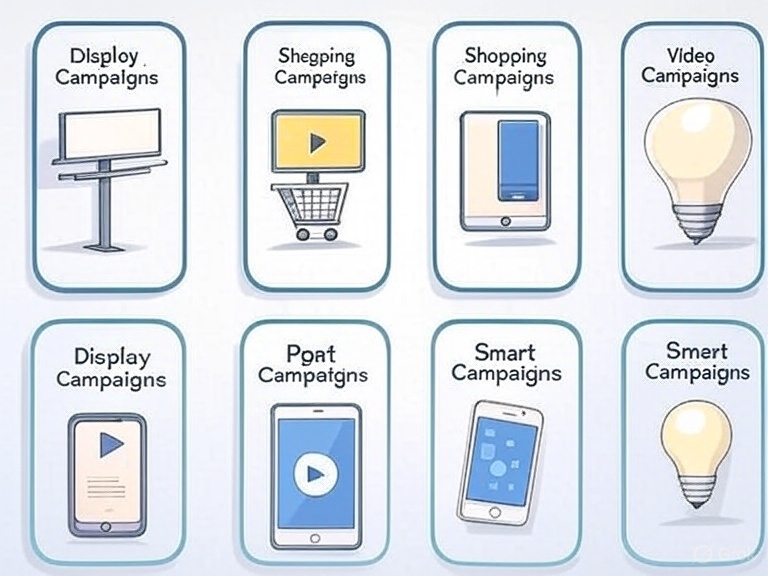
Search Campaigns
Search campaigns display text ads on Google search results when users search for relevant keywords. These ads appear above and below organic search results, marked with “Sponsored” or “Ad” labels. Search campaigns are ideal for capturing users with high purchase intent who are actively looking for specific products or services.
Display Campaigns
Display campaigns show visual banner ads across Google’s Display Network, which includes over two million websites and reaches more than 90% of internet users worldwide. These campaigns are excellent for building brand awareness, remarketing to previous website visitors, and reaching users earlier in the buying funnel.
Shopping Campaigns
Shopping campaigns showcase product listings with images, prices, and store information directly in search results and Google Shopping tab. These campaigns are essential for e-commerce businesses, as they provide rich product information that helps users make informed purchasing decisions.
Video Campaigns
Video campaigns run on YouTube and across Google’s video partner sites. With YouTube being the world’s second-largest search engine, video campaigns offer powerful opportunities to engage audiences through compelling visual storytelling and demonstrations.
App Campaigns
App campaigns promote mobile app downloads and engagement across Google’s entire advertising ecosystem. The platform automatically optimizes ads across Search, Play Store, YouTube, and Display Network to drive app installations and in-app actions.
Smart Campaigns
Smart campaigns are simplified, automated campaigns designed for small businesses with limited time or advertising expertise. Google’s machine learning handles most campaign management tasks, from keyword selection to bid optimization.
Setting Up Your First Google Ads Campaign
Account Structure and Organization
Proper account structure is crucial for campaign success and management efficiency. Organize campaigns by business objectives, product categories, or target audiences. Within each campaign, create ad groups that contain tightly themed keywords and relevant ads.
A well-structured account might have separate campaigns for different product lines, with ad groups for specific product categories or keyword themes. This organization improves Quality Scores, makes optimization easier, and provides clearer performance insights.
Keyword Research and Selection
Effective keyword research forms the foundation of successful search campaigns. Use Google’s Keyword Planner, combined with tools like SEMrush or Ahrefs, to identify relevant keywords with adequate search volume and reasonable competition levels.
Consider different keyword match types: broad match for maximum reach, phrase match for moderate control, exact match for precision targeting, and negative keywords to exclude irrelevant traffic. Start with a mix of match types, then optimize based on performance data.
Creating Compelling Ad Copy
Google search ads have limited character counts, making every word crucial. Headlines should include target keywords and clear value propositions, while descriptions should highlight unique benefits and include strong calls-to-action.
Use ad extensions to provide additional information and increase ad real estate. Extensions like sitelinks, callouts, structured snippets, and location extensions can significantly improve click-through rates and provide more value to potential customers.
Landing Page Optimization
The page users visit after clicking your ad significantly impacts campaign success. Landing pages should be highly relevant to ad content, load quickly, and guide visitors toward desired actions. Ensure mobile optimization, as mobile searches continue to dominate.
Include clear headlines that match ad messaging, prominent calls-to-action, trust signals like testimonials or security badges, and minimal navigation distractions. A seamless experience from ad to landing page improves both user satisfaction and Quality Scores.
Advanced Google Ads Strategies
Audience Targeting and Remarketing
Google Ads offers sophisticated audience targeting options beyond keywords. Create custom audiences based on website visitors, customer lists, or specific interests and behaviors. Remarketing campaigns can re-engage previous website visitors with tailored messaging based on their interaction history.
Use similar audiences to find new customers who share characteristics with your best existing customers. Combine demographic targeting with keyword targeting for more precise audience reach and improved campaign efficiency.
Automated Bidding Strategies
Google’s smart bidding uses machine learning to optimize bids in real-time based on various signals like device, location, time of day, and user behavior. Strategies like Target CPA (Cost Per Acquisition) and Target ROAS (Return On Ad Spend) can improve performance while reducing manual management time.
Start with manual bidding to understand your account’s performance characteristics, then gradually test automated strategies. Monitor performance closely when implementing automated bidding, as algorithms need time to learn and optimize.
Ad Extensions and Formats
Maximize your ad’s visibility and usefulness with various extensions. Sitelink extensions direct users to specific pages, callout extensions highlight key benefits, price extensions show product pricing, and promotion extensions advertise current offers.
Use responsive search ads that automatically test different headline and description combinations to find the most effective messaging. Google’s responsive ads can show up to 15 headlines and 4 descriptions, creating numerous ad variations for testing.
Measuring Google Ads Performance
Key Metrics to Track
Monitor metrics that align with your business objectives. Click-through rate (CTR) indicates ad relevance and appeal, while conversion rate shows how effectively traffic converts to desired actions. Quality Score affects both ad positioning and costs, making it crucial for long-term success.
Track cost metrics like Cost Per Click (CPC), Cost Per Acquisition (CPA), and Return on Ad Spend (ROAS) to ensure profitable campaign performance. Use Google Analytics in conjunction with Google Ads for deeper insights into user behavior and conversion paths.
Conversion Tracking Setup
Implement comprehensive conversion tracking to measure campaign effectiveness accurately. Set up tracking for various conversion types including purchases, form submissions, phone calls, and app downloads. Use Google Tag Manager for easier implementation and management of tracking codes.
Consider different attribution models to understand how various touchpoints contribute to conversions. Google Ads offers several attribution models, from last-click to data-driven attribution, each providing different perspectives on campaign performance.
Performance Analysis and Optimization
Regularly analyze performance data to identify optimization opportunities. Look for high-performing keywords to expand, low-performing keywords to pause or modify, and ad copy variations that generate better results.
Use A/B testing for continuous improvement, testing one element at a time for clear insights. Test different ad headlines, descriptions, landing pages, and bidding strategies to incrementally improve campaign performance.
Common Google Ads Mistakes to Avoid
Many advertisers make costly errors that drain budgets without generating results. Avoid targeting overly broad keywords that attract irrelevant clicks, neglecting negative keywords that filter unqualified traffic, and using generic ad copy that doesn’t differentiate your offering.
Don’t ignore mobile users or create poor mobile experiences, as mobile searches dominate. Similarly, failing to implement conversion tracking makes optimization impossible, while not setting up proper account structure leads to management difficulties and poor Quality Scores.
Google Ads Best Practices
Continuous Testing and Optimization
Successful Google Ads management requires ongoing testing and refinement. Regularly test new keywords, ad copy variations, landing pages, and bidding strategies. Use statistical significance to make data-driven decisions rather than making changes based on limited data.
Create a testing calendar to systematically evaluate different campaign elements. Document test results to build institutional knowledge and avoid repeating unsuccessful experiments.
Quality Score Optimization
Focus on improving Quality Score, as it directly affects ad costs and positioning. Improve keyword relevance by creating tightly themed ad groups, write compelling ad copy that includes target keywords, and ensure landing pages provide excellent user experiences.
Monitor Quality Score trends at the keyword level and address low-scoring keywords through improved ad relevance or landing page optimization. Higher Quality Scores lead to lower costs and better ad positions.
Budget Management
Start with conservative budgets while learning what works for your business, then scale successful campaigns gradually. Use campaign-level budget settings to control spending, and monitor performance closely to avoid budget waste on underperforming elements.
Consider dayparting to show ads during peak performance hours, and use geographic targeting to focus budget on your most profitable markets. Regular budget reallocation based on performance ensures maximum return on investment.
The Future of Google Ads
Google Ads continues evolving with advancing technology and changing user behaviors. Artificial intelligence and machine learning play increasingly important roles in campaign optimization, from automated bidding to responsive ad creation.
Privacy changes and cookie deprecation are reshaping audience targeting approaches, while voice search growth requires consideration of conversational keywords. Visual search capabilities and augmented reality features represent emerging opportunities for innovative advertisers.
Getting Started with Google Ads
Begin your Google Ads journey by clearly defining your advertising objectives and target audience. Conduct thorough keyword research using Google’s free tools, then create your first campaign with a modest budget to test effectiveness.
Focus on one campaign type initially to learn the platform thoroughly before expanding to additional campaign types. Consider starting with Search campaigns, as they typically generate the most immediate and measurable results for businesses new to Google Ads.
Many businesses benefit from working with certified Google Ads professionals or agencies, especially when managing larger budgets or complex campaigns. The Google Partner program identifies qualified professionals with proven expertise and access to beta features.
Conclusion
Google Ads represents one of the most powerful and measurable advertising platforms available to businesses today. Success requires strategic planning, continuous optimization, and staying current with platform changes and best practices.
The platform’s sophisticated targeting options, diverse campaign types, and robust measurement capabilities make it suitable for businesses of all sizes and industries. Whether you’re looking to drive immediate sales, build brand awareness, or generate qualified leads, Google Ads provides the tools and reach to achieve your marketing objectives.
Start with clear goals, focus on relevance and user experience, and let performance data guide your optimization efforts. With patience and strategic management, Google Ads can become a significant driver of business growth and customer acquisition.
The key to Google Ads success lies in viewing it as an ongoing process rather than a one-time setup. Continuous learning, testing, and optimization based on performance data will help you maximize return on investment and achieve sustainable advertising success.